# Standalone Activities - TypeScript SDK
> Execute Activities independently without a Workflow using the Temporal TypeScript SDK.
> **Public Preview**
Standalone Activities are Activities that run independently, without being orchestrated by a
Workflow. Instead of starting an Activity from within a Workflow Definition, you start a Standalone
Activity directly from a Temporal Client.
The way you write the Activity and register it with a Worker is identical to [Workflow
Activities](/develop/typescript/activities/basics). The only difference is that you execute a
Standalone Activity directly from your Temporal Client.
This page covers the following:
- [Get Started with Standalone Activities](#get-started)
- [Write an Activity Function](#write-activity)
- [Run a Worker with the Activity registered](#run-worker)
- [Run the sample client](#run-sample)
- [Execute a Standalone Activity with type checking](#execute-activity-type-checking)
- [Execute a Standalone Activity without type checking](#execute-activity-no-type-checking)
- [Start a Standalone Activity without waiting for the result](#start-activity)
- [Get a handle to an existing Standalone Activity](#get-activity-handle)
- [Wait for the result of a Standalone Activity](#get-activity-result)
- [List Standalone Activities](#list-activities)
- [Count Standalone Activities](#count-activities)
- [Run Standalone Activities with Temporal Cloud](#run-standalone-activities-temporal-cloud)
> **📝 Note:**
>
> This documentation uses source code from the [standalone-activity](https://github.com/temporalio/samples-typescript/tree/main/standalone-activity) sample.
>
## Get Started with Standalone Activities
Prerequisites:
- **Temporal TypeScript SDK** (v1.17.0 or higher). See the [TypeScript Quickstart](/develop/typescript/set-up-your-local-typescript) for install instructions.
- **Temporal CLI** v1.7.0 or higher
Install with Homebrew:
```bash
brew install temporal
```
Or see the [Temporal CLI install guide](/cli/setup-cli) for other platforms.
Verify the installation:
```bash
temporal --version
```
Start the Temporal development server:
```bash
temporal server start-dev
```
This command automatically starts the Temporal development server with the Web UI, and creates the `default` Namespace.
It uses an in-memory database, so do not use it for real use cases.
> **ℹ️ Info:**
> Temporal Cloud
>
> All code samples on this page use
> [`loadClientConnectConfig()`](https://typescript.temporal.io/api/namespaces/envconfig#loadclientconnectconfig)
> to configure the Temporal Client connection. It responds to [environment
> variables](/references/client-environment-configuration) and [TOML configuration
> files](/references/client-environment-configuration), so the same code works against a local dev
> server and Temporal Cloud without changes. See [Run Standalone Activities with Temporal
> Cloud](#run-standalone-activities-temporal-cloud) below.
>
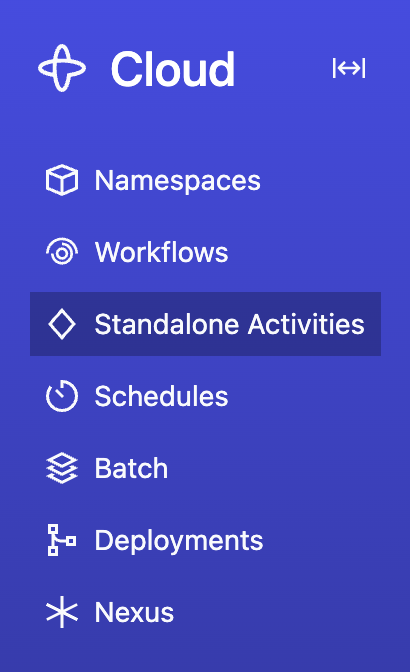
The Temporal Server will now be available for client connections on `localhost:7233`, and the
Temporal Web UI will now be accessible at [http://localhost:8233](http://localhost:8233). Standalone
Activities are available from the nav bar item located towards the top left of the page:
 Clone the [samples-typescript](https://github.com/temporalio/samples-typescript) repository to follow along:
```
git clone https://github.com/temporalio/samples-typescript.git
cd samples-typescript
```
The sample project is structured as follows:
```
standalone-activity/src/
├── activities.ts
├── execute.ts
├── list.ts
└── worker.ts
```
## Write an Activity Function
The way you write a Standalone Activity is identical to how you write an Activity to be orchestrated
by a Workflow. In fact, an Activity can be executed both as a Standalone Activity and as a Workflow
Activity.
[standalone-activity/src/activities.ts](https://github.com/temporalio/samples-typescript/blob/main/standalone-activity/src/activities.ts)
```typescript
import { ApplicationFailure } from '@temporalio/activity';
export async function greet(name: string): Promise {
if (typeof name !== 'string') {
throw ApplicationFailure.create({ message: 'name must be a string', nonRetryable: true });
}
return `Hello, ${name}!`;
}
```
## Run a Worker with the Activity registered
Running a Worker for Standalone Activities is the same as running a Worker for Workflow Activities —
you create a Worker, register the Activity, and run the Worker. The Worker doesn't need to know
whether the Activity will be invoked from a Workflow or as a Standalone Activity. See [How to run a
Worker](/develop/typescript/workers/run-worker-process#run-a-dev-worker) for more details on Worker setup and
configuration options.
[standalone-activity/src/worker.ts](https://github.com/temporalio/samples-typescript/blob/main/standalone-activity/src/worker.ts)
```typescript
import { NativeConnection, Worker } from '@temporalio/worker';
import * as activities from './activities';
import { loadClientConnectConfig } from '@temporalio/envconfig';
async function run() {
const config = loadClientConnectConfig();
const connection = await NativeConnection.connect(config.connectionOptions);
try {
const worker = await Worker.create({
connection,
namespace: 'default',
taskQueue: 'hello-standalone-activities',
activities,
});
await worker.run();
} finally {
await connection.close();
}
}
run().catch((err) => {
console.error(err);
process.exit(1);
});
```
Open a new terminal, navigate to the `samples-typescript/standalone-activity` directory, and run the Worker:
```bash
npm run start
```
Leave this terminal running - the Worker needs to stay up to process activities.
## Run the sample client
The sample file [standalone-activity/src/execute.ts](https://github.com/temporalio/samples-typescript/blob/main/standalone-activity/src/execute.ts)
contains a program demonstrating various ways to execute Standalone Activities and fetch results. The code in
the following sections is copied from this file.
To run it:
1. Make sure the Temporal Server is running (from the [Get Started](#get-started) step above).
2. Make sure the Worker is running (from the [Run a Worker](#run-worker) step above).
3. Open a new terminal, navigate to the `samples-typescript/standalone-activity` directory, and run:
```bash
npm run execute
```
## Execute a Standalone Activity with type checking
Start by [creating a Temporal Client](/develop/typescript/client/temporal-client).
Then call [`client.activity.typed()`](https://typescript.temporal.io/api/classes/client.ActivityClient#typed)
to get a typed Activity Client interface. Any TypeScript type can be used as type argument as long
as it has Activity functions as its methods. An easy way to provide such a type is to use the `typeof`
operator on imported activities. Note that calling `typed` does not create a new Client object - it
only adjusts the type annotation of the existing Client. `typed` can be called multiple times with
different type arguments to use the same Client for multiple Activity interfaces.
```typescript
import { Connection, Client, ActivityExecutionFailedError } from '@temporalio/client';
import { loadClientConnectConfig } from '@temporalio/envconfig';
import * as activities from './activities';
import { nanoid } from 'nanoid';
const config = loadClientConnectConfig();
const connection = await Connection.connect(config.connectionOptions);
const client = new Client({ connection });
const activitiesClient = client.activity.typed();
```
Afterwards, call the [`execute`](https://typescript.temporal.io/api/interfaces/client.TypedActivityClient#execute)
method of the typed client to execute a Standalone Activity. Call this from your application code, not from
inside a Workflow Definition. This durably enqueues your Standalone Activity in the Temporal Server, waits
for it to be executed on your Worker, and then fetches the result. An unknown or mistyped Activity name, or
wrong argument types will cause compilation to fail.
```typescript
const taskQueue = 'hello-standalone-activities';
const activityOptions = {
taskQueue,
startToCloseTimeout: '10s',
};
// In practice, use a meaningful business identifier, like customer or transaction identifier
const activityId = nanoid();
const result = await activitiesClient.execute('greet', {
...activityOptions,
id: activityId,
args: ['World'],
});
```
## Execute a Standalone Activity without type checking
Since Activity types are not always available, the [`start`](https://typescript.temporal.io/api/classes/client.ActivityClient#start)
and [`execute`](https://typescript.temporal.io/api/classes/client.ActivityClient#execute) methods can be
called on [`ActivityClient`](https://typescript.temporal.io/api/classes/client.ActivityClient) directly
without using the typed interface. When called that way, neither the Activity name nor argument types are
checked client-side.
```typescript
await client.activity.execute('greet', {
...activityOptions,
id: activityId,
args: [1],
});
```
Or use the Temporal CLI:
```bash
temporal activity execute \
--type greet \
--activity-id my-standalone-activity-id \
--task-queue hello-standalone-activities \
--start-to-close-timeout 10s \
--input '"World"'
```
## Start a Standalone Activity without waiting for the result
Starting a Standalone Activity means sending a request to the Temporal Server to durably enqueue
your Activity job, without waiting for it to be executed by your Worker.
Use
[`start`](https://typescript.temporal.io/api/interfaces/client.TypedActivityClient#start) method of
the client or the typed interface to start your Standalone Activity and get a handle:
```typescript
const handle = await activitiesClient.start('greet', {
...activityOptions,
id: activityId,
args: ['Temporal'],
});
```
Or use the Temporal CLI:
```bash
temporal activity start \
--type greet \
--activity-id my-standalone-activity-id \
--task-queue hello-standalone-activities \
--start-to-close-timeout 10s \
--input '"World"'
```
## Get a handle to an existing Standalone Activity
You can also use [`getHandle`](https://typescript.temporal.io/api/classes/client.ActivityClient#gethandle)
to create a handle to a previously started Standalone Activity. Because the client doesn't know
how the Activity was started, this method is not available in the typed interface. The method
takes an optional type argument to constrain the Activity result type, but correctness of this argument
is not verified.
```typescript
const newHandle = client.activity.getHandle(activityId);
```
You can now use the handle to wait for the result, describe, cancel, or terminate the Activity.
## Wait for the result of a Standalone Activity
Under the hood, calling [`execute`](https://typescript.temporal.io/api/interfaces/client.TypedActivityClient#execute)
is the same as calling [`start`](https://typescript.temporal.io/api/interfaces/client.TypedActivityClient#start)
to durably enqueue the Standalone Activity, and then calling `await handle.result()` to
wait for the Activity to be executed and fetch the result:
```typescript
console.log(await handle.result()); // Hello, Temporal!
```
Or use the Temporal CLI to wait for a result by Activity Id:
```bash
temporal activity result --activity-id my-standalone-activity-id
```
## List Standalone Activities
Use
[`list`](https://typescript.temporal.io/api/classes/client.ActivityClient#list) method of the client to list
Standalone Activity Executions that match a [List Filter](/list-filter) query. The result is an `AsyncIterable`
that yields [`ActivityExecutionInfo`](https://typescript.temporal.io/api/interfaces/client.ActivityExecutionInfo)
entries.
These APIs return only Standalone Activity Executions. Activities running inside Workflows are not included.
```typescript
const query = 'TaskQueue="hello-standalone-activities"';
for await (const a of client.activity.list(query)) {
console.log(
`${a.activityId} | ${a.activityRunId} | ${a.activityType} | ${a.status} | ${a.closeTime?.toISOString()}`,
);
}
```
The sample file
[standalone-activity/src/list.ts](https://github.com/temporalio/samples-typescript/blob/main/standalone-activity/src/list.ts)
shows how to list and count activities.
Run it:
```bash
npm run list
```
Or use the Temporal CLI:
```bash
temporal activity list
```
The query parameter accepts the same [List Filter](/list-filter) syntax used for [Workflow
Visibility](/visibility). For example, "ActivityType = 'MyActivity' AND Status = 'Running'".
## Count Standalone Activities
Use
[`count`](https://typescript.temporal.io/api/classes/client.ActivityClient#count) method of the client
to count Standalone Activity Executions that match a [List Filter](/list-filter) query. This returns
the total count of executions (running, completed, failed, etc.) - not the number of queued tasks. It
works the same way as counting Workflow Executions. The same query will work for both listing and
counting.
```typescript
const { count } = await client.activity.count(query);
console.log(`Total activities: ${count}`);
```
The sample file
[standalone-activity/src/list.ts](https://github.com/temporalio/samples-typescript/blob/main/standalone-activity/src/list.ts)
shows how to list and count activities.
Run it:
```bash
npm run list
```
Or use the Temporal CLI:
```bash
temporal activity count
```
## Run Standalone Activities with Temporal Cloud
The code samples on this page use [`loadClientConnectConfig`](https://typescript.temporal.io/api/namespaces/envconfig#loadclientconnectconfig),
so the same code works against Temporal Cloud - just configure the connection via environment variables or a TOML
profile. No code changes are needed.
For a step-by-step guide on connecting to Temporal Cloud, including Namespace creation, certificate
generation, and authentication setup in the Cloud UI, see
[Connect to Temporal Cloud](/develop/typescript/client/temporal-client#connect-to-temporal-cloud).
### Connect with mTLS
Set these environment variables with values from your Temporal Cloud Namespace settings:
```
export TEMPORAL_ADDRESS=..tmprl.cloud:7233
export TEMPORAL_NAMESPACE=.
export TEMPORAL_TLS_CLIENT_CERT_PATH='path/to/your/client.pem'
export TEMPORAL_TLS_CLIENT_KEY_PATH='path/to/your/client.key'
```
### Connect with an API key
Set these environment variables with values from your Temporal Cloud API key settings:
```
export TEMPORAL_ADDRESS=..tmprl.cloud:7233
export TEMPORAL_NAMESPACE=.
export TEMPORAL_API_KEY=
```
Then run the Worker and starter code as shown in the earlier sections.
Clone the [samples-typescript](https://github.com/temporalio/samples-typescript) repository to follow along:
```
git clone https://github.com/temporalio/samples-typescript.git
cd samples-typescript
```
The sample project is structured as follows:
```
standalone-activity/src/
├── activities.ts
├── execute.ts
├── list.ts
└── worker.ts
```
## Write an Activity Function
The way you write a Standalone Activity is identical to how you write an Activity to be orchestrated
by a Workflow. In fact, an Activity can be executed both as a Standalone Activity and as a Workflow
Activity.
[standalone-activity/src/activities.ts](https://github.com/temporalio/samples-typescript/blob/main/standalone-activity/src/activities.ts)
```typescript
import { ApplicationFailure } from '@temporalio/activity';
export async function greet(name: string): Promise {
if (typeof name !== 'string') {
throw ApplicationFailure.create({ message: 'name must be a string', nonRetryable: true });
}
return `Hello, ${name}!`;
}
```
## Run a Worker with the Activity registered
Running a Worker for Standalone Activities is the same as running a Worker for Workflow Activities —
you create a Worker, register the Activity, and run the Worker. The Worker doesn't need to know
whether the Activity will be invoked from a Workflow or as a Standalone Activity. See [How to run a
Worker](/develop/typescript/workers/run-worker-process#run-a-dev-worker) for more details on Worker setup and
configuration options.
[standalone-activity/src/worker.ts](https://github.com/temporalio/samples-typescript/blob/main/standalone-activity/src/worker.ts)
```typescript
import { NativeConnection, Worker } from '@temporalio/worker';
import * as activities from './activities';
import { loadClientConnectConfig } from '@temporalio/envconfig';
async function run() {
const config = loadClientConnectConfig();
const connection = await NativeConnection.connect(config.connectionOptions);
try {
const worker = await Worker.create({
connection,
namespace: 'default',
taskQueue: 'hello-standalone-activities',
activities,
});
await worker.run();
} finally {
await connection.close();
}
}
run().catch((err) => {
console.error(err);
process.exit(1);
});
```
Open a new terminal, navigate to the `samples-typescript/standalone-activity` directory, and run the Worker:
```bash
npm run start
```
Leave this terminal running - the Worker needs to stay up to process activities.
## Run the sample client
The sample file [standalone-activity/src/execute.ts](https://github.com/temporalio/samples-typescript/blob/main/standalone-activity/src/execute.ts)
contains a program demonstrating various ways to execute Standalone Activities and fetch results. The code in
the following sections is copied from this file.
To run it:
1. Make sure the Temporal Server is running (from the [Get Started](#get-started) step above).
2. Make sure the Worker is running (from the [Run a Worker](#run-worker) step above).
3. Open a new terminal, navigate to the `samples-typescript/standalone-activity` directory, and run:
```bash
npm run execute
```
## Execute a Standalone Activity with type checking
Start by [creating a Temporal Client](/develop/typescript/client/temporal-client).
Then call [`client.activity.typed()`](https://typescript.temporal.io/api/classes/client.ActivityClient#typed)
to get a typed Activity Client interface. Any TypeScript type can be used as type argument as long
as it has Activity functions as its methods. An easy way to provide such a type is to use the `typeof`
operator on imported activities. Note that calling `typed` does not create a new Client object - it
only adjusts the type annotation of the existing Client. `typed` can be called multiple times with
different type arguments to use the same Client for multiple Activity interfaces.
```typescript
import { Connection, Client, ActivityExecutionFailedError } from '@temporalio/client';
import { loadClientConnectConfig } from '@temporalio/envconfig';
import * as activities from './activities';
import { nanoid } from 'nanoid';
const config = loadClientConnectConfig();
const connection = await Connection.connect(config.connectionOptions);
const client = new Client({ connection });
const activitiesClient = client.activity.typed();
```
Afterwards, call the [`execute`](https://typescript.temporal.io/api/interfaces/client.TypedActivityClient#execute)
method of the typed client to execute a Standalone Activity. Call this from your application code, not from
inside a Workflow Definition. This durably enqueues your Standalone Activity in the Temporal Server, waits
for it to be executed on your Worker, and then fetches the result. An unknown or mistyped Activity name, or
wrong argument types will cause compilation to fail.
```typescript
const taskQueue = 'hello-standalone-activities';
const activityOptions = {
taskQueue,
startToCloseTimeout: '10s',
};
// In practice, use a meaningful business identifier, like customer or transaction identifier
const activityId = nanoid();
const result = await activitiesClient.execute('greet', {
...activityOptions,
id: activityId,
args: ['World'],
});
```
## Execute a Standalone Activity without type checking
Since Activity types are not always available, the [`start`](https://typescript.temporal.io/api/classes/client.ActivityClient#start)
and [`execute`](https://typescript.temporal.io/api/classes/client.ActivityClient#execute) methods can be
called on [`ActivityClient`](https://typescript.temporal.io/api/classes/client.ActivityClient) directly
without using the typed interface. When called that way, neither the Activity name nor argument types are
checked client-side.
```typescript
await client.activity.execute('greet', {
...activityOptions,
id: activityId,
args: [1],
});
```
Or use the Temporal CLI:
```bash
temporal activity execute \
--type greet \
--activity-id my-standalone-activity-id \
--task-queue hello-standalone-activities \
--start-to-close-timeout 10s \
--input '"World"'
```
## Start a Standalone Activity without waiting for the result
Starting a Standalone Activity means sending a request to the Temporal Server to durably enqueue
your Activity job, without waiting for it to be executed by your Worker.
Use
[`start`](https://typescript.temporal.io/api/interfaces/client.TypedActivityClient#start) method of
the client or the typed interface to start your Standalone Activity and get a handle:
```typescript
const handle = await activitiesClient.start('greet', {
...activityOptions,
id: activityId,
args: ['Temporal'],
});
```
Or use the Temporal CLI:
```bash
temporal activity start \
--type greet \
--activity-id my-standalone-activity-id \
--task-queue hello-standalone-activities \
--start-to-close-timeout 10s \
--input '"World"'
```
## Get a handle to an existing Standalone Activity
You can also use [`getHandle`](https://typescript.temporal.io/api/classes/client.ActivityClient#gethandle)
to create a handle to a previously started Standalone Activity. Because the client doesn't know
how the Activity was started, this method is not available in the typed interface. The method
takes an optional type argument to constrain the Activity result type, but correctness of this argument
is not verified.
```typescript
const newHandle = client.activity.getHandle(activityId);
```
You can now use the handle to wait for the result, describe, cancel, or terminate the Activity.
## Wait for the result of a Standalone Activity
Under the hood, calling [`execute`](https://typescript.temporal.io/api/interfaces/client.TypedActivityClient#execute)
is the same as calling [`start`](https://typescript.temporal.io/api/interfaces/client.TypedActivityClient#start)
to durably enqueue the Standalone Activity, and then calling `await handle.result()` to
wait for the Activity to be executed and fetch the result:
```typescript
console.log(await handle.result()); // Hello, Temporal!
```
Or use the Temporal CLI to wait for a result by Activity Id:
```bash
temporal activity result --activity-id my-standalone-activity-id
```
## List Standalone Activities
Use
[`list`](https://typescript.temporal.io/api/classes/client.ActivityClient#list) method of the client to list
Standalone Activity Executions that match a [List Filter](/list-filter) query. The result is an `AsyncIterable`
that yields [`ActivityExecutionInfo`](https://typescript.temporal.io/api/interfaces/client.ActivityExecutionInfo)
entries.
These APIs return only Standalone Activity Executions. Activities running inside Workflows are not included.
```typescript
const query = 'TaskQueue="hello-standalone-activities"';
for await (const a of client.activity.list(query)) {
console.log(
`${a.activityId} | ${a.activityRunId} | ${a.activityType} | ${a.status} | ${a.closeTime?.toISOString()}`,
);
}
```
The sample file
[standalone-activity/src/list.ts](https://github.com/temporalio/samples-typescript/blob/main/standalone-activity/src/list.ts)
shows how to list and count activities.
Run it:
```bash
npm run list
```
Or use the Temporal CLI:
```bash
temporal activity list
```
The query parameter accepts the same [List Filter](/list-filter) syntax used for [Workflow
Visibility](/visibility). For example, "ActivityType = 'MyActivity' AND Status = 'Running'".
## Count Standalone Activities
Use
[`count`](https://typescript.temporal.io/api/classes/client.ActivityClient#count) method of the client
to count Standalone Activity Executions that match a [List Filter](/list-filter) query. This returns
the total count of executions (running, completed, failed, etc.) - not the number of queued tasks. It
works the same way as counting Workflow Executions. The same query will work for both listing and
counting.
```typescript
const { count } = await client.activity.count(query);
console.log(`Total activities: ${count}`);
```
The sample file
[standalone-activity/src/list.ts](https://github.com/temporalio/samples-typescript/blob/main/standalone-activity/src/list.ts)
shows how to list and count activities.
Run it:
```bash
npm run list
```
Or use the Temporal CLI:
```bash
temporal activity count
```
## Run Standalone Activities with Temporal Cloud
The code samples on this page use [`loadClientConnectConfig`](https://typescript.temporal.io/api/namespaces/envconfig#loadclientconnectconfig),
so the same code works against Temporal Cloud - just configure the connection via environment variables or a TOML
profile. No code changes are needed.
For a step-by-step guide on connecting to Temporal Cloud, including Namespace creation, certificate
generation, and authentication setup in the Cloud UI, see
[Connect to Temporal Cloud](/develop/typescript/client/temporal-client#connect-to-temporal-cloud).
### Connect with mTLS
Set these environment variables with values from your Temporal Cloud Namespace settings:
```
export TEMPORAL_ADDRESS=..tmprl.cloud:7233
export TEMPORAL_NAMESPACE=.
export TEMPORAL_TLS_CLIENT_CERT_PATH='path/to/your/client.pem'
export TEMPORAL_TLS_CLIENT_KEY_PATH='path/to/your/client.key'
```
### Connect with an API key
Set these environment variables with values from your Temporal Cloud API key settings:
```
export TEMPORAL_ADDRESS=..tmprl.cloud:7233
export TEMPORAL_NAMESPACE=.
export TEMPORAL_API_KEY=
```
Then run the Worker and starter code as shown in the earlier sections.