# Temporal Nexus - Python SDK feature guide
> Use Temporal Nexus within the Python SDK to connect Durable Executions within and across Namespaces using a Nexus Endpoint, a Nexus Service contract, and Nexus Operations.
Use [Temporal Nexus](/evaluate/nexus) to connect Temporal Applications within and across Namespaces using a Nexus Endpoint, a Nexus Service contract, and Nexus Operations.
This page shows how to do the following:
- [Run a development Temporal Service with Nexus enabled](#run-the-temporal-nexus-development-server)
- [Create caller and handler Namespaces](#create-caller-handler-namespaces)
- [Create a Nexus Endpoint to route requests from caller to handler](#create-nexus-endpoint)
- [Define the Nexus Service contract](#define-nexus-service-contract)
- [Develop a Nexus Service and Operation handlers](#develop-nexus-service-operation-handlers)
- [Develop a caller Workflow that uses a Nexus Service](#develop-caller-workflow-nexus-service)
- [Understand exceptions in Nexus Operations](#exceptions-in-nexus-operations)
- [Cancel a Nexus Operation](#canceling-a-nexus-operation)
- [Make Nexus calls across Namespaces in Temporal Cloud](#nexus-calls-across-namespaces-temporal-cloud)
> **📝 Note:**
>
> This documentation uses source code derived from the [Python Nexus sample](https://github.com/temporalio/samples-python/tree/main/hello_nexus).
>
## Run the Temporal Development Server with Nexus enabled
Prerequisites:
- [Install the latest Temporal CLI](https://learn.temporal.io/getting_started/python/dev_environment/#set-up-a-local-temporal-service-for-development-with-temporal-cli) (`v1.3.0` or higher recommended)
- [Install the latest Temporal Python SDK](https://learn.temporal.io/getting_started/python/dev_environment/#add-temporal-python-sdk-dependencies) (`v1.14.1` or higher)
The first step in working with Temporal Nexus involves starting a Temporal Server with Nexus enabled.
```
temporal server start-dev
```
This command automatically starts the Temporal development server with the Web UI, and creates the `default` Namespace. It uses an in-memory database, so do not use it for real use cases.
The Temporal Web UI should now be accessible at [http://localhost:8233](http://localhost:8233), and the Temporal Server should now be available for client connections on `localhost:7233`.
## Create caller and handler Namespaces
Before setting up Nexus endpoints, create separate Namespaces for the caller and handler.
```
temporal operator namespace create --namespace my-target-namespace
temporal operator namespace create --namespace my-caller-namespace
```
For this example, `my-target-namespace` will contain the Nexus Operation handler, and you will use a Workflow in `my-caller-namespace` to call that Operation handler.
We use different namespaces to demonstrate cross-Namespace Nexus calls.
## Create a Nexus Endpoint to route requests from caller to handler
After establishing caller and handler Namespaces, the next step is to create a Nexus Endpoint to route requests.
```
temporal operator nexus endpoint create \
--name my-nexus-endpoint-name \
--target-namespace my-target-namespace \
--target-task-queue my-handler-task-queue
```
You can also use the Web UI to create the Namespaces and Nexus endpoint.
## Define the Nexus Service contract
Defining a clear contract for the Nexus Service is crucial for smooth communication.
In this example, there is a service package that describes the Service and Operation names along with input/output types for caller Workflows to use the Nexus Endpoint.
Each [Temporal SDK includes and uses a default Data Converter](https://docs.temporal.io/dataconversion).
The default data converter encodes payloads in the following order: Null, Byte array, Protobuf JSON, and JSON.
In a polyglot environment, that is where more than one language and SDK is being used to develop a Temporal solution, Protobuf and JSON are common choices.
This example uses Python dataclasses serialized into JSON.
[hello_nexus/service.py](https://github.com/temporalio/samples-python/blob/main/hello_nexus/service.py)
```python
from dataclasses import dataclass
import nexusrpc
@dataclass
class MyInput:
name: str
@dataclass
class MyOutput:
message: str
@nexusrpc.service
class MyNexusService:
my_sync_operation: nexusrpc.Operation[MyInput, MyOutput]
my_workflow_run_operation: nexusrpc.Operation[MyInput, MyOutput]
```
## Develop a Nexus Service handler and Operation handlers
Nexus Operation handlers are typically defined in the same Worker as the underlying Temporal primitives they abstract.
Operation handlers can decide if a given Nexus Operation will be synchronous or asynchronous.
They can invoke underlying Temporal primitives such as a Query, Signal, or Update using the Temporal SDK Client, or run other reliable code.
Handlers should be reliable since the [circuit breaker](/nexus/operations#circuit-breaking) trips after 5 consecutive retryable errors (for example: worker timeouts), blocking all Operations from the caller to that Endpoint.
The `nexusrpc.handler` and `temporalio.nexus` modules have utilities to help create Nexus Operations:
- `nexusrpc.handler.sync_operation` - Create a synchronous operation handler
- `nexus.workflow_run_operation` - Create an asynchronous operation handler that starts a Workflow
### Develop a Synchronous Nexus Operation handler
The `@nexusrpc.handler.sync_operation` decorator is for exposing simple RPC handlers.
[hello_nexus/handler/service_handler.py](https://github.com/temporalio/samples-python/blob/main/hello_nexus/handler/service_handler.py)
```python
import nexusrpc
@nexusrpc.handler.service_handler(service=MyNexusService)
class MyNexusServiceHandler:
@nexusrpc.handler.sync_operation
async def my_sync_operation(
self, ctx: nexusrpc.handler.StartOperationContext, input: MyInput
) -> MyOutput:
return MyOutput(message=f"Hello {input.name} from sync operation!")
```
A synchronous operation handler must return quickly (less than `10s`).
Implementations can also make other calls, but handlers should be reliable to avoid tripping the [circuit breaker](/nexus/operations#circuit-breaking).
### Use the Temporal Client for Signals, Queries, and Updates
A common pattern is to use the Temporal Client from within a sync handler to Signal, Query, or Update a Workflow.
You can also use Signal-With-Start or Update-With-Start to ensure the Workflow is started and send it a Signal or Update.
All calls must complete within the [Nexus request timeout](/cloud/limits#nexus-operation-request-timeout). Updates should be short-lived to stay within this deadline.
The [nexus_messaging](https://github.com/temporalio/samples-python/tree/main/nexus_messaging) sample shows how to create a Nexus Service that uses synchronous operations to send Updates and Queries.
Use `nexus.client()` to get the Client that the Worker was initialized with. In this example, the Workflow Id is derived from the client Id, with the "get_workflow_id" method. This takes a given client Id (in this case, the client is passing in a user ID) to generate a Workflow Id from it.
This way the client only needs the identifier it cares about.
[nexus_messaging/callerpattern/handler/service_handler.py](https://github.com/temporalio/samples-python/blob/main/nexus_messaging/callerpattern/handler/service_handler.py)
```python
from temporalio import nexus
def get_workflow_id(user_id: str) -> str:
return f"{WORKFLOW_ID_PREFIX}{user_id}"
@nexusrpc.handler.service_handler(service=NexusGreetingService)
class NexusGreetingServiceHandler:
def _get_workflow_handle(
self, user_id: str
) -> WorkflowHandle[GreetingWorkflow, str]:
return nexus.client().get_workflow_handle_for(
GreetingWorkflow.run, get_workflow_id(user_id)
)
...
```
There are two examples of messaging through Nexus in the sample code, [caller pattern](https://github.com/temporalio/samples-python/blob/main/nexus_messaging/callerpattern/) and [on demand pattern](https://github.com/temporalio/samples-python/blob/main/nexus_messaging/ondemandpattern/).
The caller pattern shows how to send messages to an existing Workflow, while the on-demand pattern shows how to start a Workflow through Nexus and then send Signals to it.
In addition to `nexus.client()`, you can use `nexus.info()` to access information about the currently-executing Nexus Operation including its Task Queue.
### Develop an Asynchronous Nexus Operation handler to start a Workflow
Use the `@nexus.workflow_run_operation` decorator, which is the easiest way to expose a Workflow as an operation.
[hello_nexus/handler/service_handler.py](https://github.com/temporalio/samples-python/blob/main/hello_nexus/handler/service_handler.py)
```python
import nexusrpc
from temporalio import nexus
@nexusrpc.handler.service_handler(service=MyNexusService)
class MyNexusServiceHandler:
@nexus.workflow_run_operation
async def my_workflow_run_operation(
self, ctx: nexus.WorkflowRunOperationContext, input: MyInput
) -> nexus.WorkflowHandle[MyOutput]:
return await ctx.start_workflow(
WorkflowStartedByNexusOperation.run,
input,
id=str(uuid.uuid4()),
)
```
Workflow IDs should typically be business-meaningful IDs and are used to dedupe Workflow starts. In general, the ID should be passed in the Operation input as part of the Nexus Service contract.
> **💡 Tip:**
> RESOURCES
>
> [Attach multiple Nexus callers to a handler Workflow](/nexus/operations#attaching-multiple-nexus-callers) with a Conflict-Policy of Use-Existing.
>
#### Map a Nexus Operation input to multiple Workflow arguments
A Nexus Operation can only take one input parameter. If you want a Nexus Operation to start a Workflow that takes multiple arguments use the `ctx.start_workflow` method.
[nexus_multiple_args/handler/service_handler.py](https://github.com/temporalio/samples-python/blob/main/nexus_multiple_args/handler/service_handler.py)
```py
@nexusrpc.handler.service_handler(service=MyNexusService)
class MyNexusServiceHandler:
"""
Service handler that demonstrates multiple argument handling in Nexus operations.
"""
# This is a nexus operation that is backed by a Temporal workflow.
# The key feature here is that it demonstrates how to map a single input object
# (HelloInput) to a workflow that takes multiple individual arguments.
@nexus.workflow_run_operation
async def hello(
self, ctx: nexus.WorkflowRunOperationContext, input: HelloInput
) -> nexus.WorkflowHandle[HelloOutput]:
"""
Start a workflow with multiple arguments unpacked from the input object.
"""
return await ctx.start_workflow(
HelloHandlerWorkflow.run,
args=[
input.name, # First argument: name
input.language, # Second argument: language
],
id=f"hello-multi-args-{input.name}-{input.language}",
)
```
### Register your Nexus Service handler in a Worker
After developing an asynchronous Nexus Operation handler to start a Workflow, the next step is to register your Nexus Service handler in a Worker.
At this stage you can pass any arguments you need to your service handler's `__init__` method.
[hello_nexus/handler/worker.py](https://github.com/temporalio/samples-python/blob/main/hello_nexus/handler/worker.py)
```python
async def main():
client = await Client.connect("localhost:7233", namespace=NAMESPACE)
worker = Worker(
client,
task_queue=TASK_QUEUE,
workflows=[WorkflowStartedByNexusOperation],
nexus_service_handlers=[MyNexusServiceHandler()],
)
await worker.run()
```
## Develop a caller Workflow that uses the Nexus Service
To execute a Nexus Operation from the caller Workflow, import the necessary service definition and operation input/output types:
[hello_nexus/caller/workflows.py](https://github.com/temporalio/samples-python/blob/main/hello_nexus/caller/workflows.py)
```python
from temporalio import workflow
with workflow.unsafe.imports_passed_through():
from hello_nexus.service import MyInput, MyNexusService, MyOutput
@workflow.defn
class CallerWorkflow:
@workflow.run
async def run(self, name: str) -> tuple[MyOutput, MyOutput]:
nexus_client = workflow.create_nexus_client(
service=MyNexusService,
endpoint=NEXUS_ENDPOINT,
)
# Start the nexus operation and wait for the result in one go, using execute_operation.
wf_result = await nexus_client.execute_operation(
MyNexusService.my_workflow_run_operation,
MyInput(name),
)
# Alternatively, you can use start_operation to obtain the operation handle and
# then `await` the handle to obtain the result.
sync_operation_handle = await nexus_client.start_operation(
MyNexusService.my_sync_operation,
MyInput(name),
)
sync_result = await sync_operation_handle
return sync_result, wf_result
```
### Register the caller Workflow in a Worker and start the caller Workflow
After developing the caller Workflow, the next step is to register it with a Worker.
Finally, the caller Workflow must be started using `client.start_workflow()` or `client.execute_workflow()`
These steps are the same as for any normal Workflow.
The Python sample combines them in a single application.
See [hello_nexus/caller/app.py](https://github.com/temporalio/samples-python/blob/main/hello_nexus/caller/app.py) for reference.
## Exceptions in Nexus operations
Temporal provides general guidance on [Errors in Nexus operations](https://docs.temporal.io/references/failures#errors-in-nexus-operations).
In Python, there are three Nexus-specific exception classes:
- [`nexusrpc.OperationError`](https://nexus-rpc.github.io/sdk-python/nexusrpc.OperationError.html): this is the exception type you should raise in a Nexus operation to indicate that it has failed according to its own application logic and should not be retried.
- [`nexusrpc.HandlerError`](https://nexus-rpc.github.io/sdk-python/nexusrpc.HandlerError.html): you can raise this exception type in a Nexus operation with a specific [HandlerErrorType](https://nexus-rpc.github.io/sdk-python/nexusrpc.HandlerErrorType.html). The error will be marked retryable or non-retryable according to the type, following the [Nexus spec](https://github.com/nexus-rpc/api/blob/main/SPEC.md#predefined-handler-errors). The non-retryable handler error types are `BAD_REQUEST`, `UNAUTHENTICATED`, `UNAUTHORIZED`, `NOT_FOUND`, `NOT_IMPLEMENTED`; the retryable types are `RESOURCE_EXHAUSTED`, `INTERNAL`, `UNAVAILABLE`, `UPSTREAM_TIMEOUT`.
- [`temporalio.exceptions.NexusOperationError`](https://python.temporal.io/temporalio.exceptions.NexusOperationError.html): this is the error raised inside a Workflow when a Nexus operation fails for any reason. Use the `__cause__` attribute on the exception to access the cause chain.
## Canceling a Nexus Operation
To cancel a Nexus Operation from within a Workflow, call `handle.cancel()` on the operation handle. Only asynchronous operations can be canceled in Nexus, since cancellation is sent using an operation token.
The Workflow or other resources backing the operation may choose to ignore the cancellation request.
If ignored, the operation may enter a terminal state.
When a Nexus operation is started, the caller can specify different cancellation types that control how the caller reacts to cancellation:
- `ABANDON` - Do not request cancellation of the operation.
- `TRY_CANCEL` - Initiate a cancellation request and immediately report cancellation to the caller. Note that this type doesn't guarantee that cancellation is delivered to the operation handler if the caller exits before the delivery is done.
- `WAIT_REQUESTED` Request cancellation of the operation and wait for confirmation that the request was received. Doesn't wait for actual cancellation.
- `WAIT_COMPLETED` - Wait for operation completion. Operation may or may not complete as cancelled.
The default is `WAIT_COMPLETED`. Users can set a different option for `cancellation_type` when starting or executing an operation.
Once the caller Workflow completes, the caller's Nexus Machinery will not make any further attempts to cancel operations that are still running.
It's okay to leave operations running in some use cases.
To ensure cancellations are delivered, wait for all pending operations to finish before exiting the Workflow.
See the [Nexus cancellation sample](https://github.com/temporalio/samples-python/tree/main/nexus_cancel) for reference.
## Make Nexus calls across Namespaces in Temporal Cloud
This section assumes you are already familiar with how to connect a Worker to Temporal Cloud.
The `tcld` CLI is used to create Namespaces and the Nexus Endpoint, and mTLS client certificates will be used to securely connect the caller and handler Workers to their respective Temporal Cloud Namespaces.
### Install the latest `tcld` CLI and generate certificates
To install the latest version of the `tcld` CLI, run the following command (on macOS):
```
brew install temporalio/brew/tcld
```
If you don't already have certificates, you can generate them for mTLS Worker authentication using the command below:
```
tcld gen ca --org $YOUR_ORG_NAME --validity-period 1y --ca-cert ca.pem --ca-key ca.key
```
These certificates will be valid for one year.
### Create caller and handler Namespaces
Before deploying to Temporal Cloud, ensure that the appropriate Namespaces are created for both the caller and handler.
If you already have these Namespaces, you don't need to do this.
```
tcld login
tcld namespace create \
--namespace \
--cloud-provider aws \
--region us-west-2 \
--ca-certificate-file 'path/to/your/ca.pem' \
--retention-days 1
tcld namespace create \
--namespace \
--cloud-provider aws \
--region us-west-2 \
--ca-certificate-file 'path/to/your/ca.pem' \
--retention-days 1
```
Alternatively, you can create Namespaces through the UI: [https://cloud.temporal.io/Namespaces](https://cloud.temporal.io/Namespaces).
### Create a Nexus Endpoint to route requests from caller to handler
To create a Nexus Endpoint you must have a Developer account role or higher, and have NamespaceAdmin permission on the `--target-namespace`.
```
tcld nexus endpoint create \
--name \
--target-task-queue my-handler-task-queue \
--target-namespace \
--allow-namespace \
--description-file hello_nexus/endpoint_description.md
```
The `--allow-namespace` is used to build an Endpoint allowlist of caller Namespaces that can use the Nexus Endpoint, as described in Runtime Access Control.
Alternatively, you can create a Nexus Endpoint through the UI: [https://cloud.temporal.io/nexus](https://cloud.temporal.io/nexus).
## Observability
### Web UI
A synchronous Nexus Operation will surface in the caller Workflow as follows, with just `NexusOperationScheduled` and `NexusOperationCompleted` events in the caller's Event history:
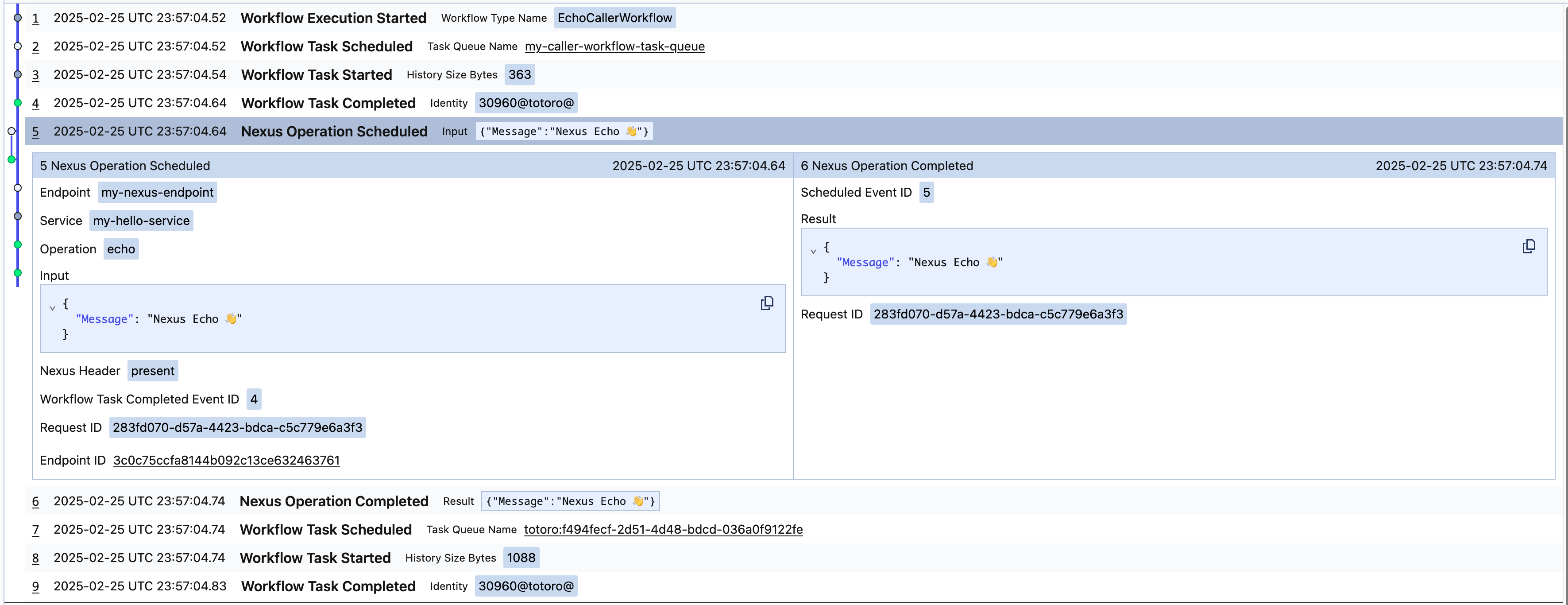
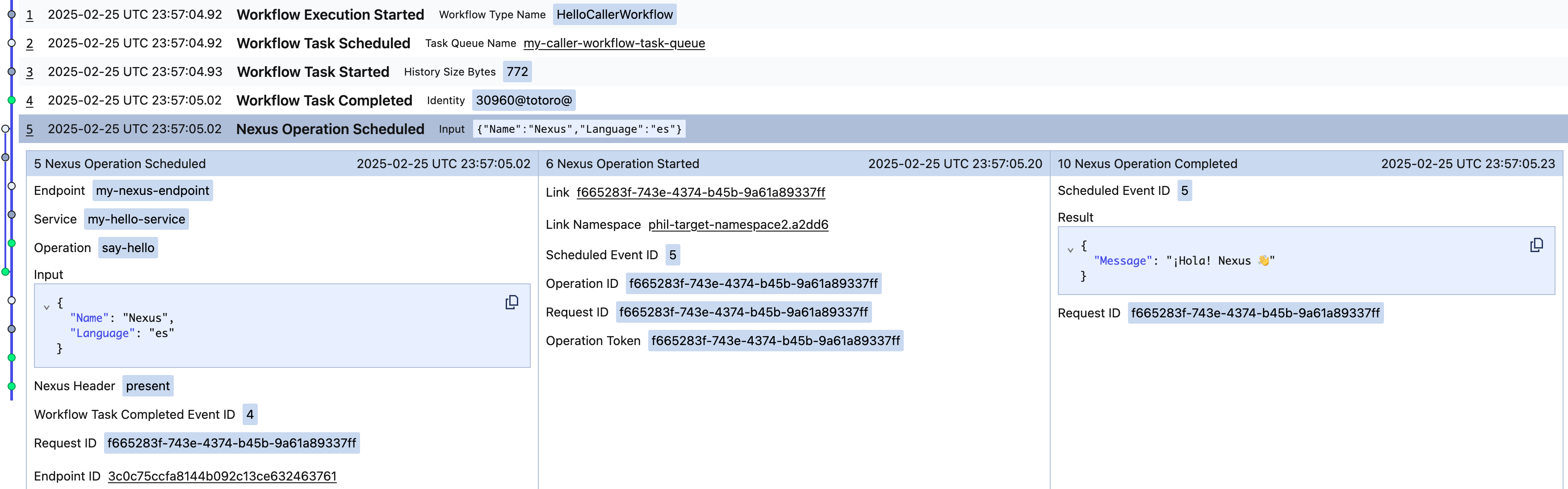
An asynchronous Nexus Operation will surface in the caller Workflow as follows, with `NexusOperationScheduled`, `NexusOperationStarted`, and `NexusOperationCompleted`, in the caller's Event history:
### Temporal CLI
Use the `workflow describe` command to show pending Nexus Operations in the caller Workflow and any attached callbacks on the handler Workflow:
```
temporal workflow describe -w
```
Nexus events are included in the caller's Event history:
```
temporal workflow show -w
```
For **asynchronous Nexus Operations** the following are reported in the caller's history:
- `NexusOperationScheduled`
- `NexusOperationStarted`
- `NexusOperationCompleted`
For **synchronous Nexus Operations** the following are reported in the caller's history:
- `NexusOperationScheduled`
- `NexusOperationCompleted`
> **📝 Note:**
>
> `NexusOperationStarted` isn't reported in the caller's history for synchronous operations.
>
## Learn more
- Read the high-level description of the [Temporal Nexus feature](/evaluate/nexus) and watch the [Nexus keynote and demo](https://youtu.be/qqc2vsv1mrU?feature=shared&t=2082).
- Learn how Nexus works in the [Nexus deep dive talk](https://www.youtube.com/watch?v=izR9dQ_eIe4) and [Encyclopedia](/nexus).
- Deploy Nexus Endpoints in production with [Temporal Cloud](/cloud/nexus).